
06 · Other surfaces
Run AI agents in private browser profiles.
On this page
Donut Browser gives each AI agent a browser profile with its own fingerprint, cookies and proxy. Donut contains no AI model and sends nothing to model providers: you bring the agent. Connect it in one of two ways.
| Remote MCP | Local REST API and CDP | |
|---|---|---|
| Agent | An MCP client, such as Claude Code, Claude Desktop, Cursor, Codex or OpenClaw | Your own script or agent on the same computer |
| Where page data goes | Through Donut’s relay at api.donutbrowser.com to your agent | From the browser to your script, on 127.0.0.1 |
| Plan | Solo for profiles and proxies; Pro, Team or Enterprise for browser control | Profile and proxy management on every plan; launching needs Pro, Team or Enterprise |
Your agent’s model receives what your agent sends it. With a local model on the local path, page data stays on your computer. For what agents do with this, see AI agents.
Connect an MCP client
- Sign in to the desktop app on Solo or above. Open Integrations in the sidebar (Cmd/Ctrl+I), select the Remote MCP tab and turn on Remote control.
- Under Clients, click Add next to your client. The app creates a
dmk_credential if you have none, and adds a server nameddonut-browserto the client’s config. For Claude Desktop, it installs an extension. - To test it, ask the agent to list your Donut profiles.
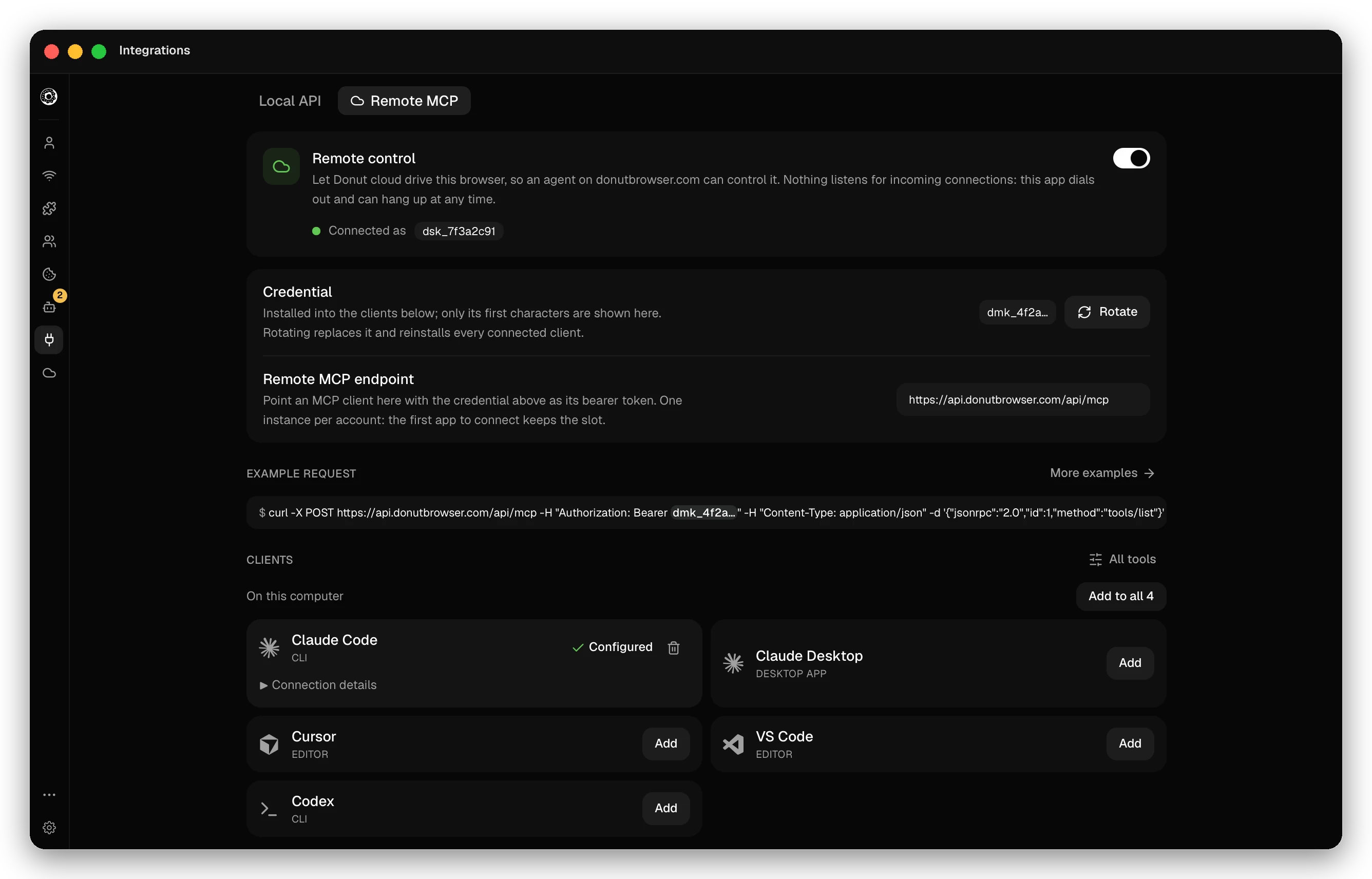
| Client | What the app writes |
|---|---|
| Claude Code | ~/.claude.json |
| Claude Desktop | An extension in the Claude Extensions folder of Claude’s app |
| Cursor | ~/.cursor/mcp.json |
| Codex | config.toml in ~/.codex, or in $CODEX_HOME if set |
The same button works for 18 more clients, among them VS Code, Zed, Windsurf, Gemini CLI, GitHub Copilot CLI, Goose, OpenCode and MCPorter. The app edits each config file in place and keeps your other servers.
Every tool schema costs the agent context. To load fewer, choose groups under Tools agents see in the app, or name toolsets on the URL. What the relay can read is listed in What the relay sees.
Add it by hand
Create a credential on your account page or in the app, then add the endpoint to your client.
Claude Code:
claude mcp add --transport http --scope user donut-browser \
  https://api.donutbrowser.com/api/mcp \
  --header "Authorization: Bearer dmk_…"
Cursor, in ~/.cursor/mcp.json:
{
  "mcpServers": {
    "donut-browser": {
      "url": "https://api.donutbrowser.com/api/mcp",
      "headers": { "Authorization": "Bearer dmk_…" }
    }
  }
}
Codex, in ~/.codex/config.toml. Codex reads the credential from the environment variable you name:
[mcp_servers.donut-browser]
url = "https://api.donutbrowser.com/api/mcp"
bearer_token_env_var = "DONUT_MCP_TOKEN"
OpenClaw
The app does not write OpenClaw’s config. Add the server with the OpenClaw CLI, and set DONUT_MCP_TOKEN to your credential in the environment that runs OpenClaw. The single quotes keep your shell from expanding ${DONUT_MCP_TOKEN}; OpenClaw resolves it.
openclaw mcp set donut-browser '{"url":"https://api.donutbrowser.com/api/mcp","transport":"streamable-http","headers":{"Authorization":"Bearer ${DONUT_MCP_TOKEN}"}}'
openclaw mcp doctor donut-browser --probe
To give OpenClaw’s own browser tool a Donut profile and its proxy, see OpenClaw over CDP.
Run the agent locally
The local REST API listens on 127.0.0.1:10108. It launches a profile and returns a DevTools port, which the browser also binds to 127.0.0.1. Your script attaches to that port with Playwright or the MIT-licensed wayfern package. Page content and screenshots go from the browser to your script and do not pass through Donut’s servers. The browser’s requests to websites go out through the profile’s proxy.
- Download Wayfern in the app if you have not yet.
- Open Integrations in the sidebar (Cmd/Ctrl+I). On the Local API tab, turn on Enable Local API Server and copy the token.
- Export it as
DONUT_API_KEY. See Authentication.
Create a proxy and a profile
# A proxy: http, https, socks4 or socks5.
curl -sS -X POST http://127.0.0.1:10108/v1/proxies \
  -H "Authorization: Bearer $DONUT_API_KEY" \
  -H "Content-Type: application/json" \
  -d '{"name":"acme-us","proxy_settings":{"proxy_type":"socks5","host":"proxy.example.com","port":1080,"username":"user","password":"secret"}}'
# {"id":"…","name":"acme-us",…}

# A profile that browses through it. Wayfern generates its fingerprint.
curl -sS -X POST http://127.0.0.1:10108/v1/profiles \
  -H "Authorization: Bearer $DONUT_API_KEY" \
  -H "Content-Type: application/json" \
  -d '{"name":"acme-sales","browser":"wayfern","proxy_id":"<proxy id>","tags":["acme"]}'
# {"profile":{"id":"…",…}}
Add "temporary": true for a profile that keeps its data in memory and is deleted when its browser stops. Profile and proxy management works on every plan.
Launch it and attach
curl -sS -X POST http://127.0.0.1:10108/v1/profiles/<profile id>/run \
  -H "Authorization: Bearer $DONUT_API_KEY" \
  -H "Content-Type: application/json" \
  -d '{"headless":true}'
# {"profile_id":"…","remote_debugging_port":53127,"headless":true,"attached":false}urlopens a page at launch. Onlyhttp,httpsandabout:blankare accepted.- The port is a free port, chosen at each launch. If the profile is already open, the call returns its current port with
attached: trueand does not restart it. - Without Pro, Team or Enterprise, the call answers
402.
import { chromium } from "wayfern"; // or from "playwright"

const browser = await chromium.connectOverCDP(`http://127.0.0.1:${port}`);
const context = browser.contexts()[0];
const page = context.pages()[0] ?? (await context.newPage());
wayfern re-exports Playwright and adds human-like mouse movement, typing and scrolling. POST /v1/profiles/{id}/kill stops the profile.
A fully local agent with Ollama
This script runs the model with Ollama on the same computer. The model reads each page and picks a link to open or gives the answer. Ollama, the page text and the browser stay on your computer, so neither Donut nor a model provider receives the page data.
// agent.mjs. Run: npm install wayfern playwright, then
// node agent.mjs <profile id> <start url>
import { chromium } from "wayfern";

const API = "http://127.0.0.1:10108";
const OLLAMA = "http://127.0.0.1:11434/api/chat";
const MODEL = process.env.OLLAMA_MODEL ?? "qwen3"; // any model you pulled
const [profileId, startUrl] = process.argv.slice(2);
const goal = "Find the price of the cheapest plan.";
const headers = {
  Authorization: `Bearer ${process.env.DONUT_API_KEY}`,
  "Content-Type": "application/json",
};

// Launch the profile. It browses through its own proxy.
const run = await fetch(`${API}/v1/profiles/${profileId}/run`, {
  method: "POST",
  headers,
  body: JSON.stringify({ headless: true, url: startUrl }),
});
if (!run.ok) throw new Error(`run: HTTP ${run.status}`);
const { remote_debugging_port: port } = await run.json();

const browser = await chromium.connectOverCDP(`http://127.0.0.1:${port}`);
const context = browser.contexts()[0];
const page = context.pages()[0] ?? (await context.newPage());

// One step: the local model reads the page, then opens a link or answers.
async function decide() {
  const text = (await page.innerText("body")).slice(0, 6000);
  const links = await page.$$eval("a[href^='http']", (anchors) =>
    anchors.slice(0, 40).map((a) => ({ text: a.innerText.trim(), href: a.href })),
  );
  const response = await fetch(OLLAMA, {
    method: "POST",
    headers: { "Content-Type": "application/json" },
    body: JSON.stringify({
      model: MODEL,
      stream: false,
      format: "json",
      messages: [
        {
          role: "system",
          content:
            'Reply with JSON only: {"action":"open","href":"<a link from the list>"} or {"action":"answer","text":"<the answer>"}.',
        },
        {
          role: "user",
          content: `Goal: ${goal}\nURL: ${page.url()}\nLinks: ${JSON.stringify(links)}\nPage text:\n${text}`,
        },
      ],
    }),
  });
  const { message } = await response.json();
  return { step: JSON.parse(message.content), links };
}

for (let i = 0; i < 6; i++) {
  const { step, links } = await decide();
  if (step.action === "answer") {
    console.log(step.text);
    break;
  }
  // Open only links that are on the page.
  if (step.action !== "open" || !links.some((link) => link.href === step.href)) break;
  await page.goto(step.href);
}

await fetch(`${API}/v1/profiles/${profileId}/kill`, { method: "POST", headers });
Page text is untrusted input to the model. The script opens only links from the page, stops after six steps and has no action that sends, posts or pays.
OpenClaw over CDP
OpenClaw can drive a Donut profile as one of its browser profiles. For a profile with a CDP URL, OpenClaw launches no browser of its own: it uses the Donut profile, with its fingerprint, cookies and proxy.
PORT=$(curl -sS -X POST http://127.0.0.1:10108/v1/profiles/<profile id>/run \
  -H "Authorization: Bearer $DONUT_API_KEY" \
  -H "Content-Type: application/json" \
  -d '{}' | jq -r .remote_debugging_port)

openclaw browser create-profile --name acme-sales --cdp-url "http://127.0.0.1:$PORT"
openclaw browser --browser-profile acme-sales open https://example.com
The port changes when the Donut profile restarts. Then set the new port in browser.profiles.acme-sales.cdpUrl in ~/.openclaw/openclaw.json. What OpenClaw sends to a model depends on the model you configure in OpenClaw.
Isolation pattern
Use one profile and one proxy for each account.
- Create one profile per account. Each profile has its own fingerprint, cookies and storage, so two accounts never share a device or a session.
- Give each profile its own proxy or VPN, in the region the account normally uses. Do not share a proxy between accounts. The app matches each profile’s timezone and language to its proxy’s exit IP.
- Name and tag each profile after its account. The agent finds it with
list_profiles(query,tag) orGET /v1/profiles. - Keep a person on steps that cannot be undone. Over MCP,
ask_humanshows a question on the Agent page of the app and waits for your answer, andrequest_human_helphands you the profile for a sign-in, a verification challenge or a payment. In a local script, ask on the terminal before the step.
Put rules like these in your agent’s instructions (CLAUDE.md, AGENTS.md or the system prompt):
Each account has one Donut profile. Find it with list_profiles. Do not create, delete or switch profiles.
Before you send a message, post, submit a form or pay, call ask_human with what you will do and wait for the answer.
For a sign-in, a verification challenge or a payment page, call request_human_help with the profile_id.
Some sites forbid automated messages in their terms. Read them before an agent sends anything.
Plans
| What | Plan |
|---|---|
| Local REST API: profiles, groups, proxies, VPNs | Every plan |
Local REST API: run, kill, open-url, batch run and stop, agent routes | Pro, Team or Enterprise. Other plans get 402. |
| Remote MCP: profiles, groups, proxies, VPNs, extensions, human-in-the-loop tools | Solo, Pro, Team or Enterprise |
| Remote MCP: browser control (launch, navigate, click, type, read pages) and recipes | Pro, Team or Enterprise. Solo gets PLAN_REQUIRED for browser tools and does not see the recipe tools. |
Free has no MCP: the endpoint answers 402. See Pricing for each plan.
