
Run an AI Agent on Multiple Accounts Without Linking Them
An AI agent links your accounts when it logs into all of them from one browser profile, because the site sees one fingerprint, one cookie jar and one IP. Give each account its own profile with its own fingerprint and proxy, and have the agent open the right profile for each task.
This guide is for agencies with client accounts, sellers with a store per region, recruiters, QA teams and sales teams that use an agent across several workspaces. I make Donut Browser, an anti-detect browser, so the setup uses it. The model works with any tool that gives each profile its own fingerprint and IP. Check each site’s terms before you add accounts; some allow one per person.
Key Takeaways
- Accounts link through shared cookies, a shared device fingerprint, a shared IP and shared identifiers.
- The working model is one account, one profile, one IP, kept stable for the life of the account.
- Connect the agent over remote MCP (Solo for profile management, Pro for browser control) or drive profiles locally over CDP.
- Rate caps and site terms still apply, and a person should approve anything that sends, posts or pays.
Why does one browser profile link every account an agent touches?
One browser profile links every account because the site reads the same browser signals on each login:
- Cookies and storage. Two accounts logged into one profile share the cookie jar, local storage and cache, even after you log out of the first.
- The device fingerprint. Canvas, WebGL, fonts, screen and timezone are the same for every account in the profile.
- The IP address. Every login leaves through the same connection.
- Shared identifiers. The same phone number, recovery email or payment card links accounts at the account layer.
- Behavior. One agent works in the same order and at the same pace on every account.
Separate browser profiles on one computer fix only the first item. The profiles run on the same hardware, so their fingerprints match, and they share the same IP unless each one has its own proxy.
AI browsers have the same limit. Aside has multiple profiles, and its help center runs a task “in the normal browser profile” or in incognito mode (Run tasks). Its help center and changelogs, checked on 2026-10-14, describe no proxy or fingerprint setting per profile. The Aside alternative page compares the two browsers.
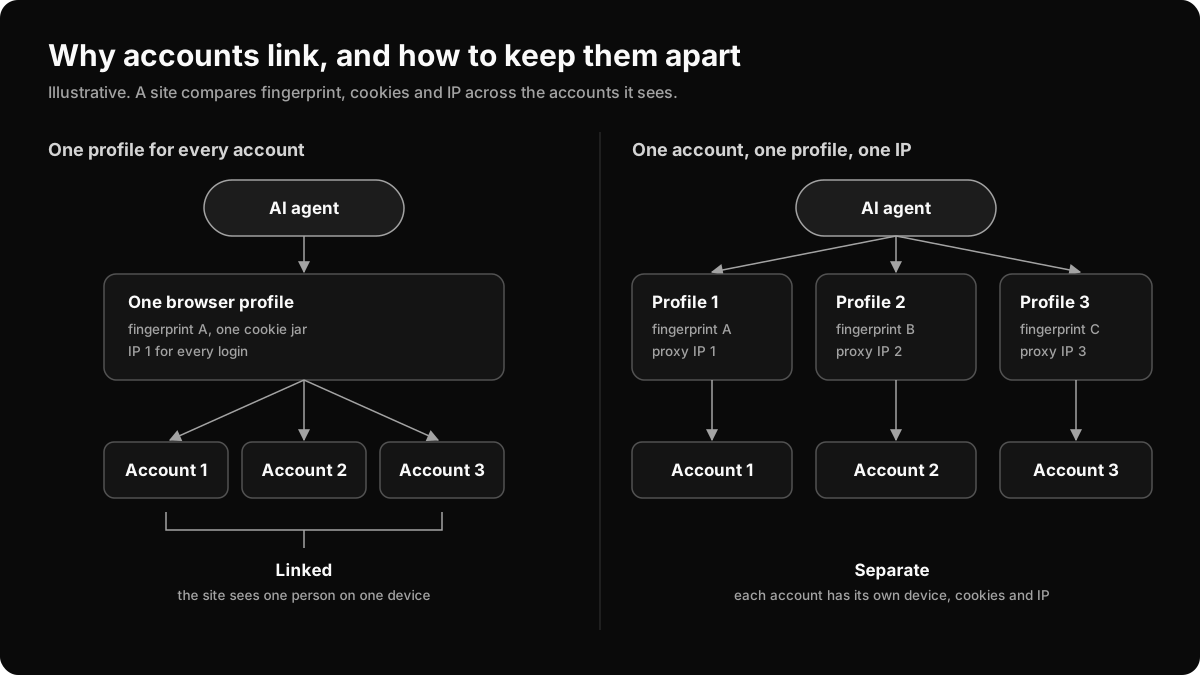
What is the one account, one profile, one IP model?
The model gives every account its own browser profile, fingerprint and proxy, and keeps all three stable for the life of the account.
| Account | Profile | Fingerprint | Proxy | Timezone and language |
|---|---|---|---|---|
| Client A, US store | client-a-us | Windows, Chrome | Sticky residential, Chicago | America/Chicago, en-US |
| Client B, German store | client-b-de | macOS, Chrome | Sticky residential, Berlin | Europe/Berlin, de-DE |
| Recruiting inbox | recruiting | Windows, Chrome | Sticky ISP, London | Europe/London, en-GB |
The rules:
- Put one account in each profile, and never log a second account into it.
- Give each profile one sticky proxy from the account’s region, and keep the same IP between sessions.
- Match the timezone and language to the proxy’s exit IP.
- Keep the fingerprint stable. A device that changes every week looks like a new device every week.
- Keep identifiers apart: email, phone, recovery address and payment method.
- Run one agent task per profile at a time.
The multi-account use case and the social media accounts guide cover warmup and per-platform detail.
How do you set up the profiles in Donut Browser?
You set up each account once, in the app or through its API, and test it before the agent touches it.
- Create one profile per account. Local profiles are unlimited, and each gets its own fingerprint from the Wayfern engine, set in its C++ layer.
- Add a proxy to each profile: HTTP, HTTPS, SOCKS4 or SOCKS5, or a WireGuard VPN. The proxy guide compares the types.
- Launch once. Donut sets timezone and language from the proxy’s exit IP and blocks the launch if they do not match. DNS goes through the profile’s route, and WebRTC leak protection stops the real IP from showing.
- Name each profile after its account, and use groups and tags per client or team. The agent finds profiles by these names.
- Bring existing sessions in if you have them. Donut imports Chromium-family browser profiles, and cookies in JSON, Netscape or Playwright storage-state format.
- Test each profile with the browser fingerprint tool, the bot detection test and the WebRTC leak test, with the proxy on.
How do you connect Claude Code or another agent?
You connect an agent over remote MCP when it should choose profiles itself, and over local CDP when a script runs a fixed job.
| Remote MCP | Local REST API and CDP | |
|---|---|---|
| Plan | Solo: profiles, proxies, groups, extensions, human-in-the-loop. Pro: adds browser control and recipe tools | Pro, for the launch endpoint |
| Client | Any MCP client: Claude Code, Claude Desktop, Cursor, Codex, VS Code, Zed | Your script: Playwright, Puppeteer or wayfern |
| Traffic | Through Donut’s relay at api.donutbrowser.com, not end-to-end encrypted | 127.0.0.1 only |
| Best for | An agent that decides which account to work on | A scheduled job you wrote as code |
For remote MCP, turn on remote control in the app under Settings, Integrations, Remote MCP, and create a dmk_ credential. The app writes the config for 22 MCP clients in one click, or you add it by hand (Remote MCP docs):
{
  "mcpServers": {
    "donut-browser-remote": {
      "url": "https://api.donutbrowser.com/api/mcp",
      "headers": { "Authorization": "Bearer dmk_…" }
    }
  }
}
Then tell the agent how accounts map to profiles. A few lines in Claude Code’s CLAUDE.md are enough:
Each account has its own Donut Browser profile, named after the account.
Before a task, call list_profiles with query set to the account name.
Launch only that profile. Never log a second account into it.
Before you send, post, pay or change a password, call ask_human and wait.
For a fixed job, the local REST API on 127.0.0.1:10108 launches each profile and returns its CDP port (REST API). This loop runs one task per profile tagged for a client:
import { chromium } from "wayfern"; // Playwright with humanized input

const API = "http://127.0.0.1:10108/v1";
const headers = {
  Authorization: `Bearer ${process.env.DONUT_API_KEY}`,
  "Content-Type": "application/json",
};

const { profiles } = await (await fetch(`${API}/profiles`, { headers })).json();

for (const profile of profiles.filter((p) => p.tags.includes("client-a"))) {
  const run = await fetch(`${API}/profiles/${profile.id}/run`, {
    method: "POST",
    headers,
    body: JSON.stringify({ headless: false }),
  });
  const { remote_debugging_port } = await run.json();
  const browser = await chromium.connectOverCDP(`http://127.0.0.1:${remote_debugging_port}`);
  const page = browser.contexts()[0].pages()[0];

  // One account's work here, in its own profile, behind its own proxy.

  await browser.close();
  await fetch(`${API}/profiles/${profile.id}/kill`, { method: "POST", headers });
}
The wayfern package (MIT) re-exports Playwright and humanizes clicks, typing and scrolling (Wayfern docs). The bot detection guide explains why input matters.
How does the agent stay inside the right account?
The agent stays inside the right account when each task names one account and the profile is the only place that account is logged in.
Write tasks with the account in them: “In the client-b-de profile, export last week’s orders.” Avoid tasks such as “check all stores” that invite the agent to switch accounts inside one profile. Split them into one task per profile.
Keep a person on the steps that change something outside the browser. The human-in-the-loop tools work on Solo and up: the agent calls ask_human, request_human_help or wait_for_human, you answer on the app’s Agent page, and you can take over the profile or pause the agent. With report_progress, the agent posts how far it has got in each profile.
On a team, profile locks stop two people or two agents from opening one profile at once, and roles decide who can open which profiles. Team costs $199 a month for two seats, then $99 per seat (pricing).
What limits apply when an agent runs many accounts?
Several limits apply, and none of them goes away with more profiles.
- Rate caps. Donut’s remote MCP answers
429 MCP_RATE_LIMITEDwith a retry time, and503 MCP_BRIDGE_BUSYwhen your desktop is busy. One desktop holds the connection at a time. - Your machine. Each running profile is a full browser, so memory sets how many run at once.
- Remote hours. Pro includes 200 hours a month of remote browsers on Windows, macOS or Linux machines.
- Site limits. Each site has its own rate limits, and fast, repeated actions on many accounts are a pattern sites watch for.
- Site terms. LinkedIn’s User Agreement says “you will only have one LinkedIn account, which must be in your real name,” and its help center says “we don’t allow the use of third-party software or browser extensions that scrape, modify the appearance of, or automate activity on LinkedIn’s website.” Separate profiles keep accounts apart. They do not make a prohibited account allowed.
How do sales teams use one agent across accounts?
Sales teams give each rep, region or client workspace its own profile, and let the agent prepare the work while a person sends it.
A typical split: the agent builds call briefs from a prospect’s site and the CRM, cleans CRM fields, and drafts follow-ups in each workspace’s profile. The rep reviews and sends. Prospect research runs in a separate profile with no logins, so it touches no account. The AI agents for sales page covers this setup, and the AI agents use case covers other teams.
If privacy is the reason you keep the agent apart from your browser, read what AI browsers send to model providers first.
Frequently asked questions
Can one AI agent manage multiple accounts?
Yes, if each account lives in its own browser profile with its own fingerprint, cookies and proxy. The agent opens the profile that holds the account for each task. It can work through many profiles within your machine’s resources and the rate caps of your tools and the sites.
Why do accounts get linked when an AI agent runs them?
Accounts get linked when they share a signal: a cookie jar, a device fingerprint, an IP address, or an identifier such as a phone number. An agent that logs into every account from one profile shares all the browser signals at once, so the site sees one person on one device.
Do I need a separate proxy for each account?
For accounts that must stay unlinked, yes. Give each profile its own sticky proxy from the account’s region and keep it. Match timezone and language to the exit IP; Donut Browser does this and blocks the launch on a mismatch. The proxy guide compares proxy types.
How do I give Claude Code separate browser profiles?
Create one Donut Browser profile per account, then connect Claude Code to remote MCP with a dmk_ credential. Solo lets the agent manage profiles and proxies, and Pro adds browser control. For scripts, launch a profile through the local REST API and attach Playwright over CDP.
Is it allowed to run multiple accounts with an AI agent?
It depends on each site’s terms. Many sites allow several accounts for separate businesses or clients, and some forbid it. LinkedIn’s User Agreement allows one account per person and forbids bots that add contacts or send messages.
Sources
LinkedIn User Agreement · LinkedIn Help: Automated activity on LinkedIn · Aside: Run tasks · Aside components changelog · Donut Browser Remote MCP docs · Donut Browser REST API · wayfern on npm. All retrieved 2026-10-14.
